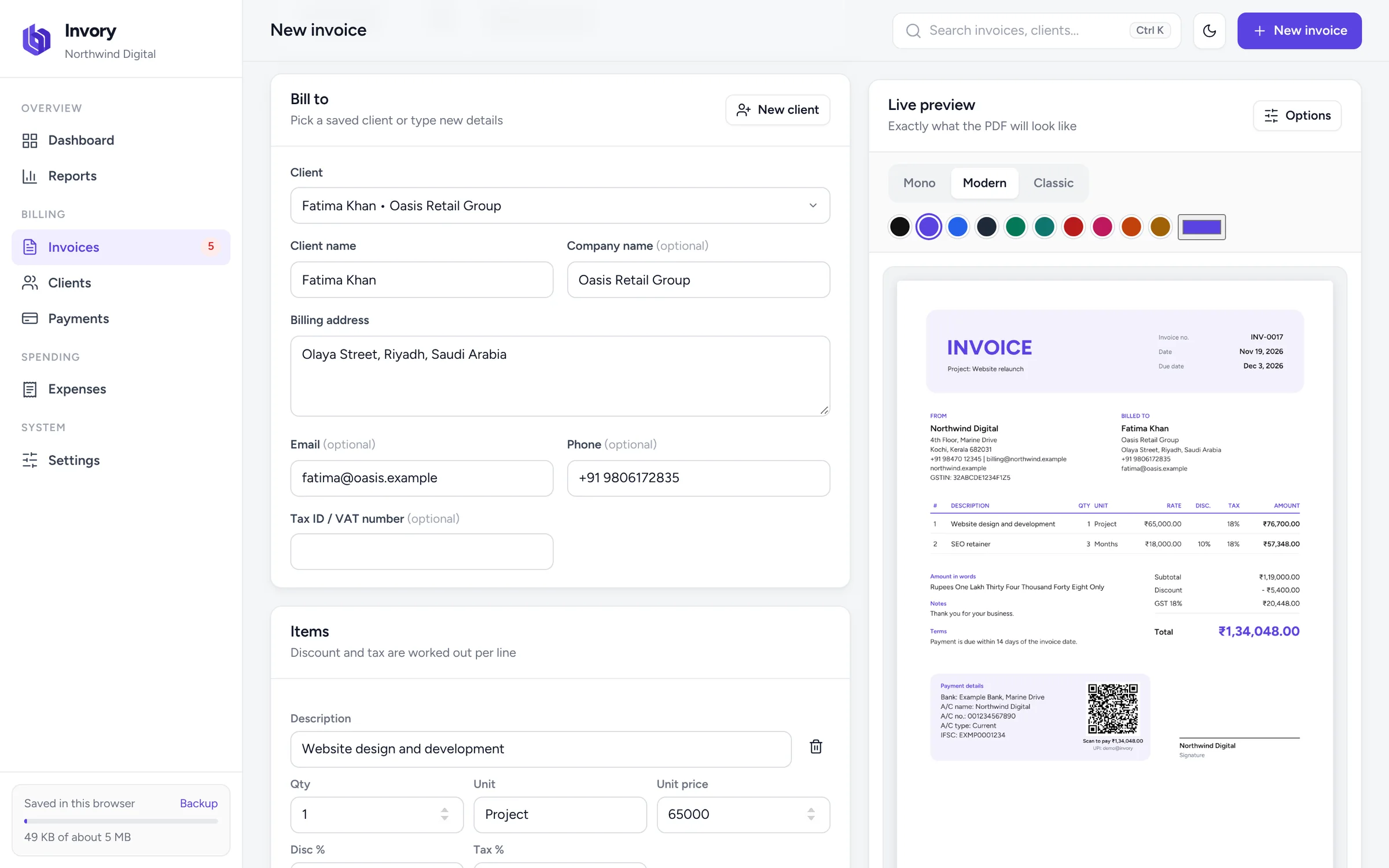
What Invory puts on your GST invoice
- Your business name, address and GSTIN, saved once in Settings
- Your client's name, billing address and GSTIN
- A unique, automatic invoice number and the invoice date
- Each item with quantity, unit, rate, discount and GST rate
- Subtotal, discount, GST totalled by rate and the grand total
- The total in words, in lakh and crore
- Your bank details, a UPI QR code and an optional signature
How GST is worked out
For each line Invory multiplies quantity by rate, takes off any discount, and then applies the GST rate to what is left. For example, 3 items at ₹1,499.99 with a 10% discount and 18% GST give a taxable value of ₹4,049.97 and GST of ₹728.99, so the line total is ₹4,778.96. Every amount is rounded to the paisa, and the totals always add up.
Good to know before you start
Invory is built to make clear, accurate invoices quickly. It shows GST as one line per rate and does not yet split CGST and SGST, show IGST separately, or add HSN and SAC columns, and it does not file returns or create e-invoices. If your business needs those, talk to your accountant about the format you must use.
Collect GST payments faster
Add your UPI ID and each unpaid invoice carries a QR code for the exact balance, GST included. Record payments as they arrive, and Invory shows what is paid, partly paid or overdue.